Computer Fundamentals
Introduction to Computer Systems
A Computer System is an integrated set of hardware and software designed to process data and produce meaningful information.
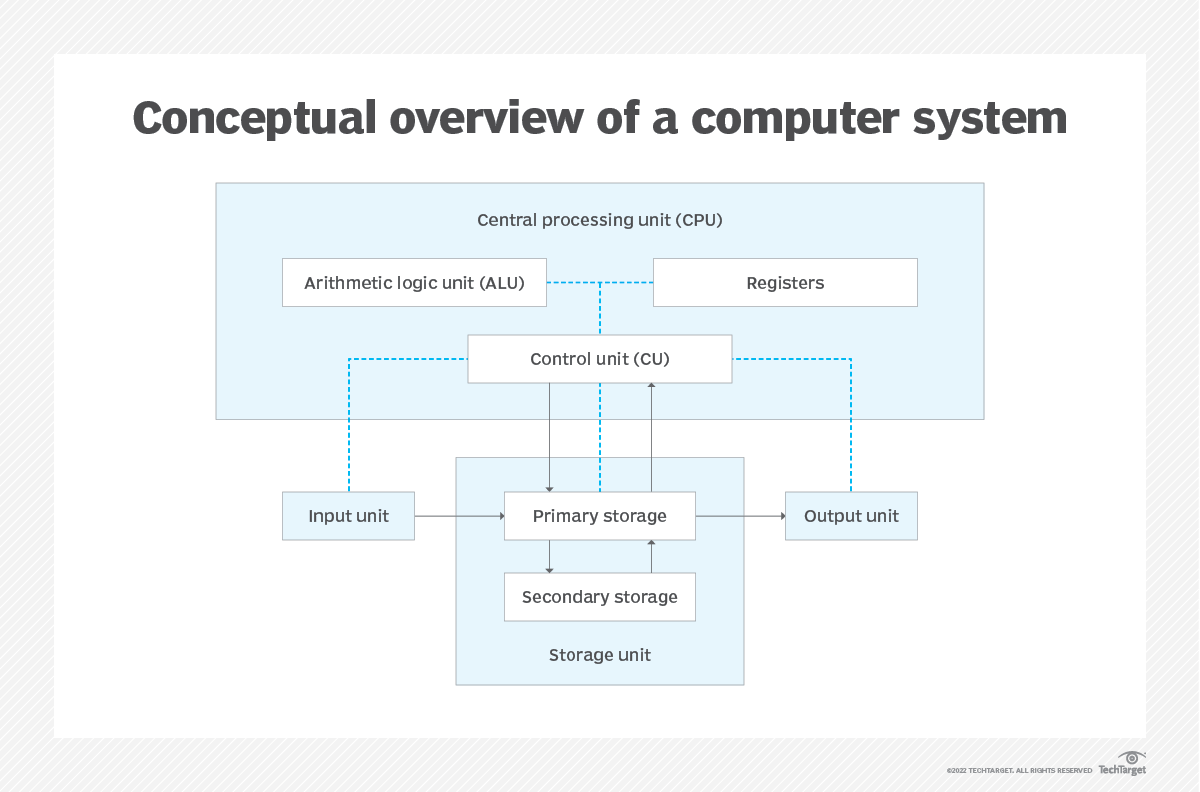
Functional Units of a Computer System
1. Input Unit - Receives data and instructions (e.g., mouse, keyboard).
2. Storage Unit - Stores data before, during, and after processing.
Primary Storage: RAM, ROM
Secondary Storage: HDD, SSD
3. Central Processing Unit (CPU) - Brain of the computer. (Components are explained later)
4. Output Unit - Displays the result (e.g., screen, printer).
Computer Hardware & Software
Hardware: The physical, tangible components of a computer system.
Input Devices: Keyboard, Mouse, Scanner, Microphone, Joystick.
Output Devices: Monitor, Printer, Speakers, Projector.
Processing Devices: Central Processing Unit (ALU, CU)
Storage Devices: Primary(RAM, ROM), Secondary(HDD, SSD, USB Drive, Optical Discs (CD/DVD)
Communication Devices: Enable data transfer between systems (Modem, NIC (Network Interface Card), Routers)
Software: The set of programs and instructions that direct hardware to perform specific tasks.
System Software
Software that manages and controls computer's hardware and provides a platform for other software (application software) to run.
Examples: Operating Systems (Windows, Linux, macOS)
Application Software
Software that are designed to perform specific tasks directly for the end-user. Unlike system software, which manages the computer's internal operations, application software focuses on helping users accomplish particular activities.
Examples: Microsoft Word (word processing), Photoshop (image editing), Browsers (Chrome, Firefox)
CPU: ALU, Registers, CU
ALU
- Performs arithmetic and logical operations
Registers
- Small high speed storage area directly inside CPU that temporary hold’s data, instructions, and addresses during processing.
Control Unit
Manages & co-ordinates all activities of the CPU,
Generates control signals that direct operations.
Memory & Storage Devices
Memory
Memory, often synonymous with RAM (Random Access Memory), is a temporary, high-speed storage area that the computer's Central Processing Unit (CPU) uses to store data and instructions that it needs to access immediately or frequently.
Types
Primary Memory
RAM (Random Access Memory) – Temporary, used for running applications.
DRAM (Dynamic RAM)
SRAM (Static RAM)
ROM (Read Only Memory) – Non-volatile, stores firmware.
- PROM, EPROM, EEPROM
Cache Memory
Small, high-speed memory close to CPU.
Stores frequently accessed data/instructions.
Registers (Discussed above)
Storage Devices
Storage devices are hardware components used for long-term, non-volatile retention of digital data. They store files, applications, and the operating system permanently, even when the computer is turned off.
Types of Storage Devices
Magnetic Storage
Data stored magnetically.
Examples: Hard Disk Drive (HDD), magnetic tapes.
Solid-State Storage
No moving parts, faster than magnetic.
Examples: SSD, memory cards, USB flash drives.
Optical Storage
Data is written and read using a laser (light).
Examples: CD, DVD, Blu-ray Discs
Operating System & Application programs
Operating System
An Operating System is system software that acts as an interface between the user and the computer hardware. It manages hardware, software resources, and provides common services for computer programs.
Examples: Windows, macOS, Linux.
Application Programs (Apps)
Software that are designed to perform specific tasks directly for the end-user. Unlike system software, which manages the computer's internal operations, application software focuses on helping users accomplish particular activities.
Examples: Microsoft Word, Google Chrome, Adobe Photoshop.
Computer virus & remedies
Computer Virus
A computer virus is a type of malicious software (malware) designed to spread from one computer to another and interfere with normal system operations.
Types of Computer Viruses
File Infector Virus
Attaches itself to executable files (.exe, .com).
Activates when the file runs.
Boot Sector Virus
Infects the master boot record (MBR) of storage devices.
Loads before the operating system starts.
Worm
Self-replicates and spreads through networks.
Consumes bandwidth and system resources.
Trojan Horse
Appears to be useful software but hides malicious code.
Doesn't replicate but opens backdoors.
Ransomware
Encrypts user files or locks the system.
Demands payment to restore access.
Polymorphic Virus
Changes its code every time it runs.
Difficult for antivirus programs to detect.
Remedies and Prevention
Install and Update Antivirus Software
Use trusted software like Windows Defender, Avast, Norton, etc.
Regularly update virus definitions.
Keep Software Updated
- Regularly update your OS and all installed applications to patch security holes.
Avoid Suspicious Links & Attachments
- Don’t open emails or download files from unknown sources.
Use a Firewall
- Helps block unauthorized access to your system.
Enable Real-Time Protection
- Most antivirus programs offer this to detect threats instantly.
Use Strong Passwords
- Protects against unauthorized access to your data.
Be Cautious with Public Wi-Fi
- Avoid accessing sensitive information on public networks.
Word Processor, Spreadsheet & PowerPoint
Word Processor
A word processor is an application program used for creating, editing, formatting, and printing text-based documents.
Examples: Microsoft Word, Google Docs, LibreOffice Writer
Common Uses: Writing reports, letters, essays, resumes
Spreadsheet
A spreadsheet is an application used to organize, analyze, and store data in tabular form, especially numbers.
Examples: Microsoft Excel, Google Sheets.
Common Uses: Budgeting, accounting, data analysis, attendance tracking
PowerPoint (Presentation Software)
PowerPoint is a presentation program used to create slideshow presentations with text, images, animations, and multimedia.
Examples: Microsoft PowerPoint, Google Slides, LibreOffice Impress
Common Uses: Business presentations, educational lectures, project reports
Computer System Configuration
Computer System Configuration refers to the detailed description of the components and settings that make up a computer system. It includes both hardware and software specifications that determine the system's performance and capabilities.
Hardware Configuration
These are the physical components of a computer.
| Component | Description |
| Processor (CPU) | Brain of the computer; handles all instructions (e.g., Intel Core i5, AMD Ryzen 7) |
| RAM (Memory) | Temporary storage that helps in multitasking (e.g., 8GB, 16GB) |
| Hard Drive / SSD | Permanent storage of data (e.g., 512GB SSD, 1TB HDD) |
| Motherboard | Main circuit board connecting all components |
| Graphics Card (GPU) | Renders images and videos; important for gaming/design |
| Power Supply Unit (PSU) | Converts electric power to run components |
| Input/Output Devices | Keyboard, Mouse, Monitor, Printer, etc. |
Software Configuration
These are the programs and system settings that control how the computer operates.
| Component | Description |
| Operating System (OS) | Manages hardware & software (e.g., Windows 11, Linux, macOS) |
| Drivers | Help OS communicate with hardware (e.g., printer, graphics card) |
| Installed Applications | User programs like Word, Excel, Chrome, Photoshop |
| System Settings | Preferences like display resolution, time/date, network settings |
| BIOS/UEFI | Firmware to initialize hardware before OS loads |
Fonts, Nepali Fonts, Unicode and Unicode Fonts
Font
A font is a style or design for text. It determines how letters, numbers, and symbols look when you type. Example fonts: Arial, Times New Roman, Calibri, etc.
Nepali Fonts
Nepali fonts are fonts that are used to write in Nepali language (Devanagari script).
There are two main types:
| Type | Description | Examples |
| Preeti-based (Legacy fonts) | Old system. Every letter is mapped to English keys using custom layouts. | Preeti, Kantipur, Sagarmatha |
| Unicode-based | Standardized system. Uses official Unicode code points for each Devanagari character. | Mangal, Noto Sans Devanagari, Kalimati |
Unicode
Unicode is a universal system that assigns a unique number (code point) to every character in every language.
For example:
The letter "क" =
U+0915in UnicodeThis makes Nepali text usable across all platforms, searchable, and compatible with modern devices.
Unicode Fonts
Unicode fonts are fonts that follow the Unicode standard and display characters based on their code points.